Why is it important
Materials on the scene should represent the real materials, this will help you to avoid completely relighting the scene when proper materials appear. Working with bad materials may affect the lighting quality significantly. Having albedo values too dark is a common mistake, out of range values would not give enough of GI, breaking the lighting. Doesn't matter if your game is stylized or not, following PBR workflow will improve your lighting quality and help you achieve your stylized yet believable result.
- A range for albedo \ diffuse \ base color for non-metals is 60-240 sRGB.
- Albedo values for metals range from 0.5 to 0.98 (180 to 250 sRGB). Lower values represent matte metal and higher values represent polished metal. Rougher the metal - darker the albedo, if Metallic has values lower than 0.8, not pure metal, then the Base Color should be darker than the pure metal.
Check this post about Unreal Engine's extra View Modes for PBR debug example.
Color space conversions
Skip to the next section if you're not into math.
The formula for converting sRGB to linear:
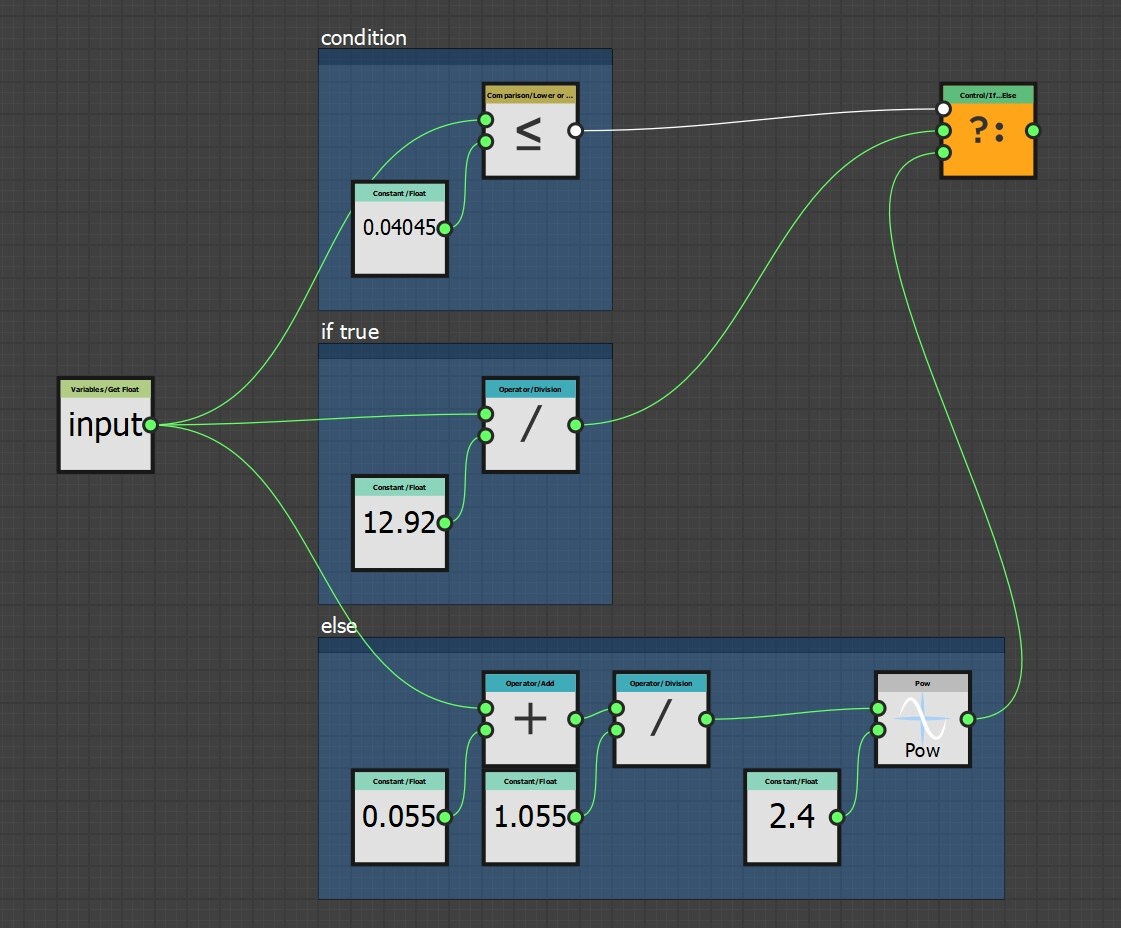
If (0 ≤ S ≤ 0.04045):
L = S/12.92
Else (0.04045 < S ≤ 1):
L = ((S+0.055)/1.055)^2.4
And Linear to sRGB:
If (0 ≤ L ≤ 0.0031308):
S = L * 12.92
Else (0.0031308 < L ≤ 1):
S = 1.055*L^(1/2.4) - 0.055
The formulas below are simplified approximations of converting sRGB to Linear and back, which should give good enough results in most cases (it gives larger relative errors in darker regions but that's where the eyes are less sensitive):
Linear RGB = ((sRGB / 255) ^ 2.2) * 255
sRGB = ((Linear RGB / 255) ^ 0.4545) * 255
2.2 # this is gamma
0.4545 = 1 / 2.2 # this is an inverse of gamma
X / 255 # this means normalizing the value (convert 0-255 range to 0-1)
To check the albedo of your texture (in sRGB space):
Albedo = ((R/255)^2.2 + (G/255)^2.2 + (B/255)^2.2) / 3

And calculate using the formula, for this example we have 0.27 albedo value (with some error):
((0/255)^2.2 + (168/255)^2.2 + (170/255)^2.2) / 3 = 0.27
To avoid doing any calculations, you can check the value in Photoshop and Substance Designer.
How to check albedo value in Photoshop
Simple way of checking texture value would be Luminosity in Histogram. Check values in the list at the end of the article (sRGB). Basically keep the textures in between the 80-240 range, roughly, the darkest albedo should be no less than 50-60 (I prefer keeping 55-60 as black surface):

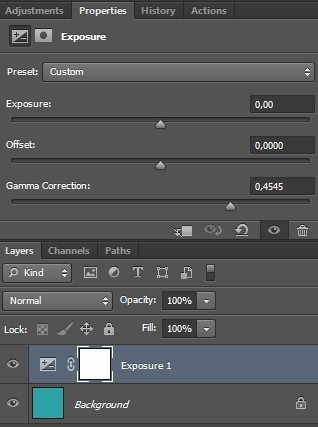
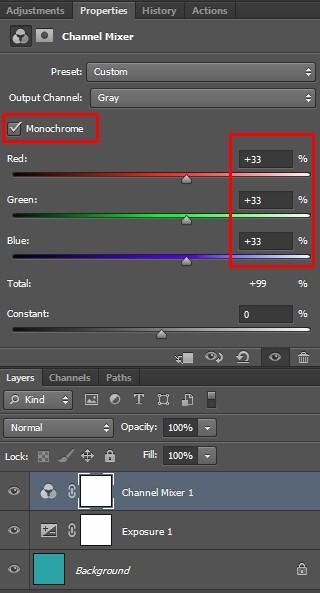
If you want to convert sRGB color to linear space and see the linear albedo values, you can do this in few steps:
1 - Add Exposure correction layer with Gamma Correction set to 0.4545
2 - Then, add Channel Mixer layer, check the Monochrome box and set all channels to 33%
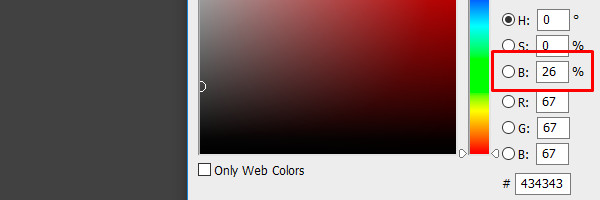
3 - With color picker you can see the albedo value, which in this case is 26%:
How to check albedo value in Substance Designer
It's easy to create a node for Albedo values validation:
1 - Function that converts sRGB to Linear:
2 - This function is used inside the Pixel Processor node which samples the input and converts each channel separately:
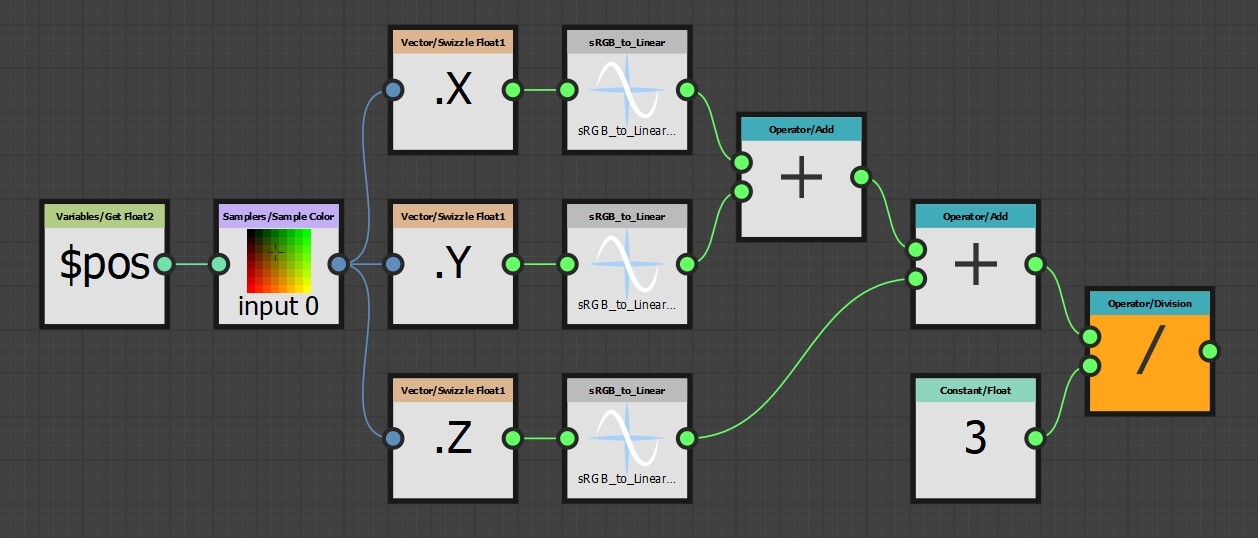
3 - In 2D view, pointing at the color with the cursor you can see it's value. In this example it's 0.26:

Albedo values
Gathered from all around the web, values are for the reference and general idea of how dark\light the common material usually is, there are always variations.
For non-metal, the darkest albedo is 0.04 for carbon, the lightest are the white paint and fresh snow with values around 0.8 (inside of 60-240 sRGB range).
Non-Metal Values
Values are represented as Linear RGB | sRGB.
Metal values
Albedo values for metals range from 0.5 to 0.98 (180 to 250 sRGB). Lower values represent matte metal and higher values represent polished metal.
Rougher the metal - darker the albedo, if Metallic has values lower than 0.8, not clearly metal, then the Base Color should be darker than it would be for pure metal (under 180).
Values are displayed in sRGB. These are for reference only and may vary.
- Iron = c4c7c7 (198, 198, 200)
- Brass = d6b97b (214, 185, 123)
- Copper = fad0c0 (250, 208, 192)
- Gold = ffe29b (255, 226, 155)
- Aluminium = f5f6f6 (245, 246, 246)
- Chrome = c4c5c5 (196, 197, 197)
- Silver = fcfaf5 (252, 250, 245)
- Cobalt = d3d2cf (211, 210, 207)
- Titanium = c1bab1 (195, 186, 177)
- Platinum = d5d0c8 (213, 208, 200)
- Nickel = d3cbbe (211, 203, 190)
- Zinc = d5eaed (213, 234, 237)
- Mercury = e5e4e4 (229, 228, 228)
- Palladium = ded9d3 (222, 217, 211)